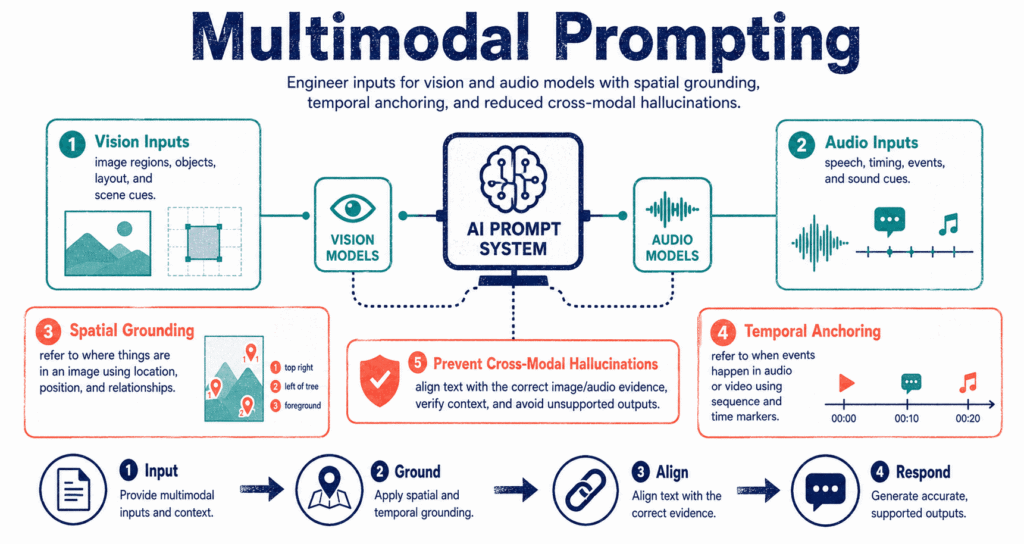
For years, prompt engineering meant typing text into a box and waiting for text to come back. That era is over. Modern models ingest audio clips, raw images, and video frames alongside your written instructions. But if you treat a multimodal prompt exactly like a standard text prompt, the model will hallucinate details, miss obvious objects, and fail entirely in production environments.
The Cross-Modal Fusion Problem
When you send an image and a text question to a model, the system must perform a mathematical translation. It converts your text into embeddings, and it chops your image into visual patches, processing them through an encoder. Multimodal learning bridges these two domains, allowing the model to project pixels and words into the same dimensional space.
The problem is precision.
A standard text query relies on sequential logic. Visual and audio data do not. When you pass a dense architectural diagram to a vision-language model without specific anchors, the attention mechanism often averages out the details, causing the model to invent labels for components that do not actually exist. The model cannot read your mind to know which corner of the image matters. You have to tell it.
Vision Prompting: Forcing Spatial Grounding
Most tutorials show you how to ask “what is in this image?” That works for a toy project. In production, asking open-ended questions against high-resolution images guarantees unpredictable JSON outputs. You must use spatial grounding.
Spatial grounding means anchoring your text instructions to specific coordinate systems or clear visual references.
[Attached: Traffic intersection image]
“Count the cars and tell me if it is safe for the pedestrian to cross.”
Why it fails: The model scans the whole image, loses track of smaller vehicles in the background, and makes a generic safety assumption based on its training data rather than the actual traffic lights.
[Attached: Traffic intersection image]
“Focus only on the bottom-right quadrant. Identify the state of the pedestrian crossing signal (red/green). Then, locate any vehicles within 10 meters of the crosswalk.”
Why it works: You constrain the attention mechanism to a specific pixel region and force the model to evaluate the signal before evaluating the cars.
When working programmatically via an API, you pass the image URL or base64 string alongside a carefully structured array of messages.
1response = client.chat.completions.create(
2    model="gpt-4o",
3    messages=[
4        {
5            "role": "user",
6            "content": [
7                {"type": "text", "text": "Read the serial number printed on the silver plate in the top-left."},
8                {
9                    "type": "image_url",
10                   "image_url": {
11                       "url": "https://example.com/hardware-part.jpg",
12                       "detail": "high" # Forces the model to crop into smaller patches
13                   }
14               }
15           ]
16       }
17   ]
18)
Audio Prompting: Temporal Anchoring
Audio models behave differently than vision models. While an image is processed as a spatial grid, audio is processed sequentially over time.
When you prompt an audio model to summarize a meeting recording, the system will often compress the timeline, blending arguments made in minute two with conclusions made in minute forty. To fix this, you must apply temporal anchoring. Ask the model to map its output to specific timestamps.
Instead of: “Summarize this customer support call.”
Use: “Extract the primary complaint from the first 30 seconds. Ignore background noise. List the support agent’s proposed solutions mapping each to its specific mm:ss timestamp.”
Applying constraints: Audio models frequently attempt to transcribe background voices. You can use negative prompting techniques directly in your instruction block. Adding “Do not transcribe the television playing in the background” acts as a strong semantic filter.
Chain of Thought on Pixels
You are likely familiar with Chain of Thought (CoT) prompting for math and logic puzzles. The exact same principle applies to multimodal inputs, but it requires a slightly different framing.
If you ask a model to “grade this handwritten math test,” it will often jump straight to the final grade and hallucinate the errors. Instead, force it to describe the scene first.
Instruct the model: “Step 1: Transcribe the handwritten equation exactly as it appears. Step 2: Solve the equation yourself. Step 3: Compare your solution to the image and output a pass/fail grade.” Forcing the model to output a text transcription first anchors its subsequent reasoning to its own generated text, drastically cutting down visual hallucinations.
Three Common Multimodal Failure Modes
Even with excellent prompts, the fusion of text, vision, and audio introduces unique points of failure that text-only engineers rarely encounter.
Key Takeaways
- Multimodal prompting requires you to anchor the model to the specific data format you are providing.
- For vision models, use spatial grounding. Reference specific quadrants, colours, or bounding-box locations in your text prompt.
- For audio models, use temporal anchoring. Ask the model to map its findings to explicit timestamps.
- Apply Chain of Thought reasoning by forcing the model to describe or transcribe the visual/audio input before it answers your primary question.
- Beware of modality bias. Do not lead the model with assumptions in your text, or it will ignore the image and simply agree with your prompt.
- API parameters matter. Setting an image detail level to “high” forces the system to process the image in smaller, more readable patches.
Conclusion
Multimodal prompting is not about talking to an AI like it is a human holding a photograph. It is about managing attention weights across different mathematical spaces.
When you upload an image or an audio file, you introduce millions of new data points into the context window. Your text prompt must serve as a strict filter, telling the model exactly what to ignore and exactly where to look. By applying spatial constraints, temporal anchors, and step-by-step transcription rules, you can pull reliable, production-ready data out of messy, unstructured media.
Start by auditing your current prompts. If you are just asking “what is happening in this file,” rewrite the instruction to tell the model exactly how to scan the input.