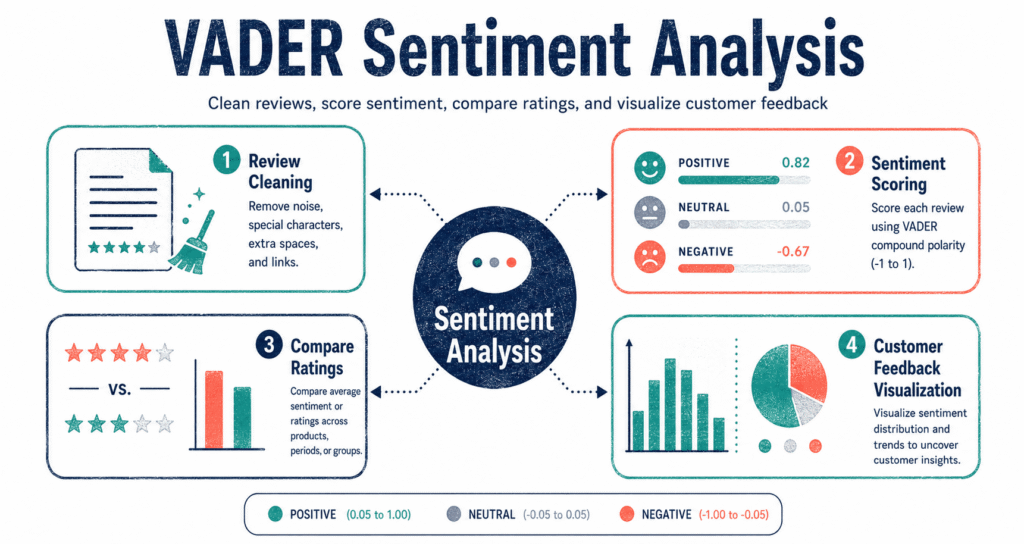
This VADER Sentiment Analysis Project analyzes customer reviews by cleaning raw text, applying VADER sentiment scoring, comparing sentiment labels with star ratings, and visualizing positive and negative language patterns.
About the project: This project works on a 10,000-row sample of Amazon Fine Food Reviews. The goal is to understand whether review text sentiment matches the given star rating. It combines text cleaning, rule-based sentiment scoring, mismatch detection, word cloud generation, boxplot analysis, and frequency-based word insights.
Project Pipeline
Steps Performed in the Project
Load 10,000 Reviews
The project begins by loading a manageable sample using pandas.read_csv() with nrows=10000.
Clean Review Text
Review text is converted to lowercase. HTML tags, punctuation, and stopwords are removed using NLTK-based preprocessing.
Output: Cleaned reviewsApply VADER Analyzer
VADER SentimentIntensityAnalyzer is applied to each cleaned review to calculate a compound sentiment score.
Output: Compound scoreClassify Sentiment
Reviews are classified as Positive, Negative, or Neutral based on compound score thresholds.
Output: Sentiment labelCompare with Star Rating
The predicted sentiment label is compared with the star rating to identify reviews where text and rating do not match.
Output: Mismatch recordsGenerate Word Clouds
Separate word clouds are created for positive and negative reviews to visually understand dominant language patterns.
Output: Positive & negative word cloudsPlot Score Distribution
A boxplot is used to compare the distribution of sentiment compound scores across different star ratings.
Output: Sentiment boxplotFind Common Words
The Counter module is used to find the top 20 most common positive and negative words after cleaning.
Output: Top word frequency listsWhat This Project Produces
Tools and Libraries Used
Project insight: Star ratings alone do not always tell the full story. A customer may give a high rating but still write a complaint, or give a low rating while mentioning a few positive aspects. Comparing text sentiment with rating helps identify these hidden mismatches.