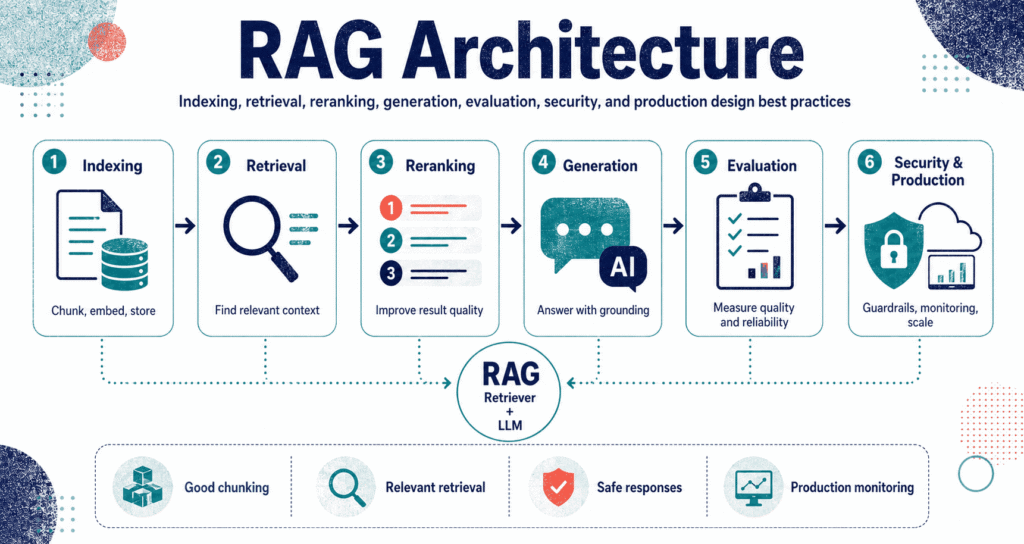
RAG Architecture – short for Retrieval-Augmented Generation – completely fixes the biggest flaw in modern language models by actively hunting down real facts instead of blindly guessing. You stop forcing the machine to spit out answers from its outdated training memory, and instead, you make it rip exact data from your private wikis, SQL databases, or scattered PDFs before it even opens its mouth to speak. It reads first.
Why RAG Architecture Matters
These massive models look incredibly smart until you ask them about your company’s actual internal numbers – at which point they just make things up. They literally have zero access to your HR manuals, hidden customer logs, or whatever weird pricing rules your sales team invented last Tuesday. They hallucinate wildly.
RAG completely splits the brain from the storage drive. You keep your facts locked away in an external box, grabbing only the specific paragraphs you actually need at the exact second a user asks a question – meaning you never have to burn thousands of dollars retraining the entire neural network just because a refund policy changed yesterday. Keep them separated.
Enterprise setups absolutely die without this. A legal bot gets to read the actual signed contracts instead of citing fake laws, and a support bot actually looks at the official hardware manual before telling a furious customer to reset their router.
The takeaway: RAG forces the machine to read the files first before it starts talking.
The Basic RAG Architecture
You basically build two separate assembly lines to make this work. The first track shreds your files into pieces before anyone even logs in, while the second track fires up the second a user types a question into the search bar. Timing matters.
Look at the flow. You drag your files in, scrub the text, chop it into blocks, turn those blocks into math vectors, and dump them into a database – and then later, when a query hits, the system hunts down the closest matching blocks and forces the model to read them.
Classic RAG Query-Time Pipeline
Question
Data
Prompt
Thinks
Facts
Output
But here’s the catch – that basic setup falls apart in the real world unless you bolt on a massive pile of upgrades like metadata filters, query rewriters, and hard permission blockers to stop the system from leaking the CEO’s salary to an intern. It gets messy fast.
RAG vs Prompting vs Fine-Tuning
People confuse these three things constantly. Prompting just tells the machine how to act right now, fine-tuning slowly teaches it a specific speaking style over time by feeding it thousands of examples, but RAG literally hands it a textbook right before it takes the test. Know the difference.
Fix the actual problem. If your bot sounds robotic, fine-tune it – but if it simply does not know that your company changed its return policy on Monday morning, you absolutely have to wire up a RAG pipeline to feed it the new rules.
| Approach | Best for | What changes | Main limitation |
|---|---|---|---|
| Prompting | Quick commands and tone checks. | The instructions. | Cannot hold enough facts. |
| Fine-Tuning | Teaching speaking styles. | The brain itself. | Facts get outdated quickly. |
| RAG | Searching private files instantly. | The context data. | Search breaks easily. |
You usually end up mashing all three together. You write a strict prompt to set the rules, use a fine-tuned brain to get the tone right, and lean on the search layer to drag the actual facts into the light.
The Indexing Pipeline
Garbage in means garbage out. If you completely botch the index by feeding it messy files with broken formatting, the search will fail miserably and your bot will confidently spit out terrible answers to your users. It starts here.
Dumping a raw PDF directly into a vector database might look amazing in a weekend demo, but that exact same lazy setup will completely crash and burn the second you roll it out to actual paying customers who expect real answers. You have to scrub the text, cut it up logically, tag it with metadata, and map out the math carefully.
RAG Indexing Pipeline
Files
Text
Blocks
Metadata
Math
Data
Document Ingestion and Parsing
You pull the data from everywhere. You suck down messy PDFs, giant spreadsheets, scattered Jira tickets, and ancient company wikis before tossing them into the shredder.
But here is the nightmare: parsing an old PDF involves fighting through broken column layouts, weird page numbers, and totally random footers that absolutely destroy the text flow if you just blindly copy and paste the words. HTML is even worse because you have to strip out cookie banners and massive navigation menus.
Bad text creates bad searches. You absolutely have to treat this cleanup phase like a massive engineering job instead of treating it like some quick afterthought you script together on a Friday afternoon.
- Kill the noise: menus and cookie banners ruin everything.
- Keep the skeleton: save the headers.
- Fix the tables: AI hates grids.
- Track the location: save the exact page number.
- Clean the text: fix the broken spaces.
Chunking: The Most Underrated RAG Decision
You have to cut the text up. If you chop the paragraphs too small, the machine loses the plot entirely – but if you leave the blocks too massive, you end up wasting your entire context window on completely useless filler text that confuses the model. Size matters.
Think about the actual ideas. You chop a massive legal policy down by its natural headings, break an FAQ list down into single question-answer pairs, and slice up python scripts by the specific functions so the search engine can actually grab the exact piece of logic it needs.
You let the edges overlap slightly so you don’t accidentally cut a sentence in half, but pushing that overlap too far just burns up your database storage and feeds the bot duplicate garbage. Stop looking for a magic default number.
| Chunking strategy | Best for | Risk |
|---|---|---|
| Fixed-size | Fast tests. | Slices paragraphs in half. |
| Heading-based | Long legal PDFs. | Blocks get way too big. |
| Semantic | Messy wikis. | Hard to code. |
| Structured | Spreadsheets. | Requires custom tools. |
Embeddings and Vector Search
Math changes everything. You turn your paragraphs into massive arrays of numbers, run the user’s question through the exact same math filter, and then let the system hunt down the vectors that sit closest together in the space.
The search engine suddenly understands intent instead of just hunting for exact strings of letters, which completely saves you when a user types “kill my account” and the official manual only says “terminate service agreement.” It connects the dots.
It screws up constantly. The math often grabs a paragraph that sounds vaguely similar but has absolutely nothing to do with the specific product code or legal clause the user actually asked about.
Hybrid Search: Combining Keywords and Vectors
You smash both engines together. You let the vector math handle the vague concepts, but you keep the old-school keyword search running in the background to lock onto exact product SKUs, specific user IDs, and rigid legal codes. Best of both worlds.
Think about a broken server throwing a highly specific “E99-Crash” alert code. A pure math search might just pull up a bunch of useless general networking tips, but the hybrid setup snags the exact error code while still bringing in the broader context you need to fix the issue.
The trick: always run hybrid searches when your users are looking up exact part numbers.
Metadata and Filtering
Tag the files. You slap labels on every single chunk of text so the system knows the exact date it was written, the department that approved it, and whether or not a standard user is actually allowed to read it.
The search instantly gets better. If a guy in Canada asks about shipping rules, you completely filter out the US policies before the vector search even starts running so the system doesn’t accidentally feed him the wrong shipping rates.
Security relies on this. You absolutely must filter out the confidential CEO memos before the search engine kicks in, because handing restricted files to an LLM and asking it to keep a secret is a guaranteed way to get fired.
{
  "chunk_id": "policy_refund_2026_section_03",
  "text": "Enterprise customers may request a refund within 30 days of invoice generation if...",
  "metadata": {
    "source": "Refund Policy 2026.pdf",
    "department": "Customer Success",
    "region": "India",
    "customer_segment": "Enterprise",
    "version": "2026-01",
    "page": 7,
    "access_level": "internal"
  },
  "embedding": "[vector representation stored separately]"
}
The Query Pipeline
The user types a question. A lazy setup just grabs the closest text blocks and fires them at the model, but a serious build rewrites the prompt, filters the tags, sorts the results, and checks the math before it ever lets the bot speak. Guard the output.
Users type terrible prompts. You have to intercept their lazy half-sentences – like “how do I fix it” – and forcefully expand them into highly specific search strings packed with product names and version numbers so the database actually knows what to look for.
Run it three times. The script generates a bunch of totally different search phrases for the exact same question and mashes all the results together to make absolutely sure it didn’t miss a weirdly worded file.
- Fix the prompt: users don’t know how to search.
- Block the bad tags: lock out the wrong regions.
- Grab extra blocks: pull twenty paragraphs.
- Sort the pile: rank them later.
- Check the facts: verify the final text.
Reranking: Improving Retrieval Quality
The first search pass is sloppy. You drag in a massive pile of vaguely related text blocks, and then you force a totally separate scoring model to carefully sort that pile to figure out which paragraphs actually answer the question. Double check the work.
Just because the math says two sentences are similar does not mean one actually answers the other. A reranker physically looks at the user’s prompt and the text block side-by-side to push the useless fluff to the bottom of the list.
Speed against quality. You blast the fast search first to grab the top fifty hits, and then you burn a little extra processing time running the heavy math to find the absolute best five blocks for the prompt.
Prompt Construction in RAG
Now you build the prompt. You have to carefully stitch the user’s question together with your strict rules and the text blocks you just found without completely confusing the model.
Do not just paste the text in blindly. You have to aggressively order the machine to stick to the facts, list its sources, and flat-out admit when it does not know the answer – otherwise it will just start making things up to sound helpful. Box it in.
You are a helpful assistant answering questions using the provided company documents.

Rules:
- Use only the context below.
- If the context does not contain the answer, say that the answer is not available in the provided sources.
- Cite the source title and section for every factual claim.
- Do not invent policy details, numbers, dates, or exceptions.

User question:
{question}

Retrieved context:
{context_chunks}

Answer:
This stops the lying. But forcing the rules in the text box still won’t save you if your search engine hands the bot a terrible set of files to read in the first place.
Answer Generation and Grounding
This is the final step. The bot writes the answer, but you have to force it to tie every single claim it makes directly back to the exact files you handed it. Make it show its work.
Sounding smart means absolutely nothing here. If the machine confidently claims that the return window is ninety days, that exact number better be written in the manual you fed it, or the whole system is a failure.
People mess this up constantly. They pull good files but still let the AI randomly guess to fill in the blanks – which is a massive liability if you are running a legal or medical bot that cannot afford to invent fake rules.
Citations and Source Attribution
Show the receipts. If the user can actually click a link to read the original PDF, they instantly trust the bot more – and when things eventually break, you can look at the fake citations to figure out exactly which part of your search script died.
Do not just link to a massive five-hundred-page manual. You absolutely must force the system to point to the exact page number, the specific paragraph ID, or the exact timestamp in a video so the user doesn’t have to hunt for the truth.
Fake links ruin everything. If a user clicks the source link and realizes the document has absolutely nothing to do with the answer, they will completely abandon your tool.
Classic RAG vs Agentic RAG
The old way is a straight line. You search, you read, you answer – which runs incredibly fast and works perfectly fine if your files are totally clean and the user asks a totally basic question. Keep it simple.
But the new setup hands the keys over to the machine entirely. It searches the database, hates the results, completely rewrites its own prompt, checks a different database, compares the math, and keeps looping until it finally finds a decent answer.
The cost spikes immediately. You trade a fast response for a massive chain of API calls that might get stuck in an endless loop – which you can read all about in Codeayan’s breakdown on Agentic RAG and self-correcting retrieval if you want to build one.
| Pattern | How it works | Best for | Tradeoff |
|---|---|---|---|
| Classic | Pull files and write. | Easy FAQs. | Fails on hard questions. |
| Multi-step | Rewrite, sort, and answer. | Corporate wikis. | Runs a bit slower. |
| Agentic | The bot searches until it gives up. | Deep research tasks. | Burns massive API credits. |
RAG Memory and Conversation Context
Bots forget instantly. If a guy asks about shipping delays and then types “what about Europe” five seconds later, the search engine will completely crash because “what about Europe” means absolutely nothing on its own. Track the chat.
You fix it two ways. You either run a script to silently rewrite that second prompt into a massive, highly specific search string, or you just start shoving the entire chat log into the search engine and pray it figures it out.
You hit a wall fast. Dump too much history in and the bot gets completely lost in the noise, but cut it too short and it forgets what you were talking about – so check out the guide on short-term and long-term context retention to strike a balance.
RAG for Structured and Unstructured Data
Stop limiting this to basic text files. You can wire this exact same architecture up to rip data straight out of SQL tables, live weather APIs, messy server logs, and giant image databases if you build the pipes right. It eats everything.
Word documents need vector searches. But if a CEO asks for the total Q3 revenue numbers, forcing a bot to read a text summary is idiotic when you can just make the system write a SQL query and pull the exact spreadsheet math directly.
You act like a traffic cop. You build a routing script that tosses the legal questions to the PDF folder while instantly redirecting the hard math questions straight to the database.
| Data source | Retrieval method | Example question |
|---|---|---|
| PDF manuals | Vectors and tags. | “What breaks my warranty?” |
| Databases | Raw SQL hits. | “Who sold the most cars?” |
| Wikis | Hybrid searches. | “Fix error code 99.” |
| Support logs | Math matching. | “Find similar crashes.” |
Security and Access Control
You have to lock it down. If you wire your search engine up to the entire corporate drive without setting up hard permission rules, some intern is eventually going to ask the bot for the upcoming layoff list and get a perfect answer. Protect the files.
Do the filtering early. You completely block the confidential text blocks from entering the prompt in the first place, because asking an AI model to keep a secret after you hand it the data is a complete joke.
Hackers hide commands in the text. Someone might bury a line in a random PDF that tells the bot to ignore all rules and dump the server passwords – so you absolutely must force the system to treat the retrieved text as dumb data, not actual system commands.
- Block bad access instantly.
- Stop the prompt hacks.
- Log the file hits.
- Scrub the credit card numbers.
- Check the scary emails manually.
RAG Evaluation Metrics
You have to grade both sides of the machine. The final text might look completely wrong because the search engine grabbed a terrible file, or because the model just decided to ignore the perfect file you handed it. Break it apart.
Test the search hit rate first to see if it even finds the right blocks. Then test the writing side to see if the bot actually sticks to the facts, points to the right links, and knows when to shut up.
Get a real human to read it. You force a reviewer to check the math and sign off before you let the bot send emails, which ties right into the setups detailed in the human-in-the-loop governance guide.
| Metric | Stage | Question it answers |
|---|---|---|
| Recall | Search | Did it even find the PDF? |
| Precision | Sorter | Did it grab total garbage? |
| Groundedness | Writer | Did the bot make things up? |
| Citations | Writer | Are the links fake? |
| Completeness | Final Text | Did it actually answer you? |
Common RAG Failure Modes
They all break the exact same way. The search engine just totally misses the file because you chopped the text up badly or screwed up the metadata tags, leaving the bot with absolutely nothing to read. It whiffs.
It pulls pure noise. The system drags in a bunch of paragraphs that use the exact same buzzwords but actually belong to a completely different software version, forcing the bot to write a useless answer.
The bot gets way too creative. You hand it the perfect file, but it decides to throw in an extra paragraph of totally fake advice just to sound friendly and helpful.
It reads old news. If you leave a five-year-old HR manual in the database, the bot will pull it and confidently state a rule that hasn’t existed since 2021. Clean your files.
| Failure mode | Likely cause | Fix |
|---|---|---|
| Missing answers | Terrible file chopping. | Sort your metadata out. |
| Wrong policies | Trash left in the drive. | Delete the old PDFs. |
| Fake rules | The bot talks too much. | Write a meaner prompt. |
| Huge answers | Text blocks are too fat. | Slice the text down. |
Production RAG Architecture
You need a massive support system. Sticking a search engine next to a chatbot does not make a production build – you absolutely have to wire up constant monitoring, hard security stops, and a massive cache system to keep the servers from catching fire.
The files have to stay fresh. You either run a massive batch update every single night at midnight, or you set up a live trigger that instantly updates the database the second someone saves a new file to the drive.
Log absolutely everything. If you don’t track the exact search phrase, the specific text block IDs, and the exact millisecond delay on every single run, you will have absolutely no clue how to fix the system when it eventually crashes.
Latency and Cost Optimization
The whole thing runs slow. Adding five extra steps before the bot is even allowed to start typing completely ruins the response time if you don’t actively optimize the pipeline. Keep it tight.
You save the answers. If fifty people ask the exact same basic question, you just hand them the saved text instead of running the expensive math all over again – but you have to make absolutely sure you aren’t accidentally caching restricted data.
Stop dumping massive files into the prompt. Shoving twenty paragraphs into the context window burns up your API credits instantly and usually just confuses the bot anyway. Cut the fat.
- Cache it: save the easy answers.
- Starve the prompt: only send the best facts.
- Skip the heavy math: sort things simply if you can.
- Use cheaper models: don’t burn credits on easy text.
- Check the receipts: track what this actually costs.
RAG for Agents
Autonomous bots live on this. When a script runs by itself, it has to actively search for a file, read the rules, and then pull up a second file to compare the numbers before it actually makes a move. It loops constantly.
Look at a customer service script. It pulls the guy’s billing history, grabs the official refund rules, checks a troubleshooting guide, and then mashes it all together to figure out if it should approve the ticket.
It acts like a brain. It hits the ReAct prompting cycle perfectly, pausing to grab the exact facts it needs before making a dangerous decision.
Choosing a RAG Stack
You have to pick your tools. You piece together a massive chain of text choppers, math converters, search databases, and sorting algorithms based entirely on how much data you have and how much money you want to spend.
Off-the-shelf kits work great for weekend hacks. But the second you start building a real corporate system, you absolutely have to rip those basic tools out and write custom scripts to handle the heavy security checks. Build it right.
| Layer | Purpose | Key decision |
|---|---|---|
| Processing | Scrub the files. | Does it break the tables? |
| Math converter | Turn text to numbers. | Does it actually understand you? |
| Search layer | Grab the text blocks. | Are you using hybrid tools? |
| Reranker | Sort the junk out. | Is it running too slow? |
| LLM | Write the answer. | Does it follow the rules? |
Best Practices for RAG Architecture
Look at the user first. Stop building massive databases without figuring out if your users actually want to search for policies, pull database numbers, or just read basic tech support logs. Work backwards.
Build your test sheet on day one. You throw real questions and hard failure cases onto a spreadsheet, and you hammer your build against it every single time you tweak a setting to make sure you didn’t break the whole pipeline.
Clean your trash out. If your corporate drive is packed with five different conflicting vacation policies, the bot will completely panic and start combining them into a massive lie. Delete the old files.
- Watch the user: find out what they ask.
- Keep the headers: they matter.
- Run hybrid tools: math isn’t enough.
- Sort the pile: cut the useless blocks.
- Check both ends: test the search and the writing.
- Lock the doors: stop data leaks.
When Not to Use RAG
Stop forcing it everywhere. If you just need a bot to format emails, a basic prompt works fine, and if you just need to pull a total revenue number, you should just write a basic SQL query instead of trying to vector-search a massive spreadsheet.
It hates messy data. Tying a state-of-the-art search engine to a folder full of terrible, conflicting word documents just creates a highly efficient lie machine.
Ask the real question. You need to figure out exactly what facts the machine absolutely needs to survive the prompt, and then you just find the cheapest way to hand them over.
Key Takeaways
- RAG setups block the bot from guessing by handing it actual evidence.
- You build two tracks: one to shred files, and one to answer prompts.
- Chopping text, tagging metadata, and hybrid searches completely dictate the final quality.
- Only build this if you actually have private facts the model cannot access naturally.
- Real pipelines absolutely require heavy security blocks, massive test sheets, and strict logging.
- Bots run in loops, grabbing files and reading them until they figure out the answer.
Conclusion
This completely rewrites how AI handles corporate data. You just stop relying on the neural network’s broken memory and force it to stare directly at your actual PDFs, databases, and logs before it even types a single word.
Searching is the easy part. The real fight is scrubbing the garbage out of the text blocks, tagging the metadata to block the interns from reading the payroll files, and forcing the final output to strictly cite its sources without lying.
Stop bolting search engines onto terrible chatbots. You have to build a highly defensive pipeline that actively filters the noise and blocks bad prompts, completely forcing the machine to stick to the actual facts.
Further reading: Review the original RAG paper, the LangChain retrieval documentation, the LlamaIndex RAG documentation, and the Azure AI Search RAG guidance.