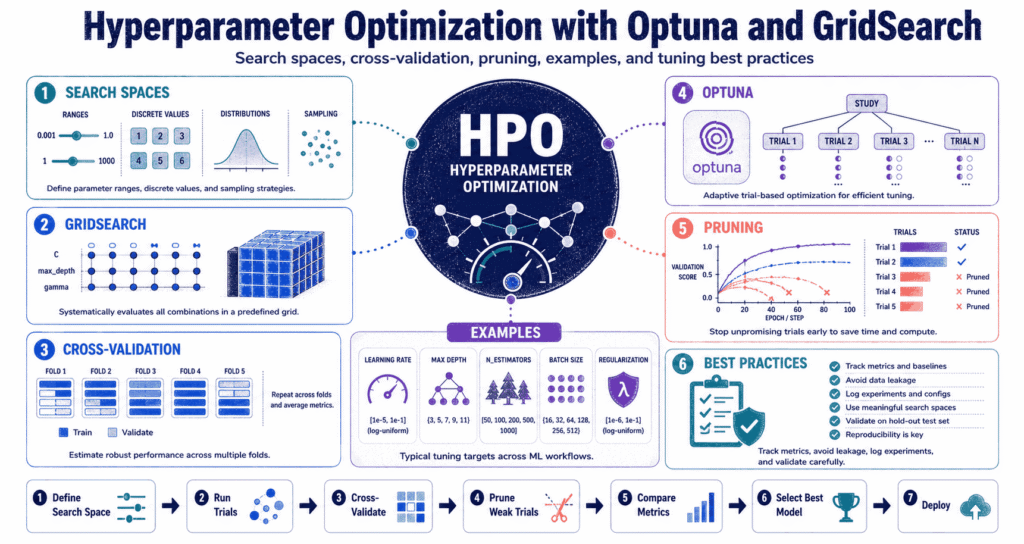
Tuning these settings manually changes everything. You have to actively hunt down the absolute best math configuration—from the exact number of decision trees to the batch size hitting the GPU—before you even think about starting the training process on a massive dataset. Defaults are garbage.
Why Hyperparameter Optimization Matters
The algorithm choice only gets you halfway there. You have to twist the knobs on a Random Forest—forcing it to grow incredibly deep trees or completely stunting its growth at the first branch—because those choices radically change the math output. Settings dictate reality.
Two engineers can feed the exact same CSV into the exact same model and end up with completely different predictions simply because one guy bumped the learning rate down a fraction of a percent. Do not trust defaults. They only act as a placeholder (and usually a bad one) before the real work starts.
Stop chasing the absolute highest accuracy score. A basic setup that actually runs within your cloud computing budget and survives contact with unseen production data will always beat some heavily tuned monster model that randomly scores half a percent higher on a lucky validation split. Simple beats lucky.
The reality check: this is just brute-force trial and error. You box in a search grid, test dozens of guesses, and blindly hope the one that passes your validation checks holds up in the real world.
Hyperparameters vs Parameters
The difference is who does the work. The network figures out the internal parameters completely on its own during the gradient descent loop—while you have to sit there and guess the hyperparameters before anything even boots up. You drive the settings.
Look at a basic tree. The split math is a parameter, but the absolute limit on how deep that tree can grow is a hyperparameter that you manually type into the code. You box in the math.
Give a model too much freedom and it just memorizes the training data—but lock it down too hard and it completely fails to understand even the most basic patterns in your CSV file. Control the boundaries.
| Concept | Meaning | Example | Who sets it? |
|---|---|---|---|
| Parameter | The math figures this out during the training loop. | The weights inside a neural network. | The machine. |
| Hyperparameter | The limits you type into the script before hitting run. | Tree depth or learning rates. | You do. |
| Search Space | The absolute boundaries you allow the script to search within. | Testing depths from 3 to 20. | You draw the box. |
| Objective | The exact math target you are hunting for. | F1-scores or raw accuracy. | The business rules. |
The Basic Hyperparameter Optimization Workflow
Stop writing code immediately. You have to figure out exactly what metric actually matters to the business and draw up a completely isolated validation split before you ever let a search script start ripping through your cloud credits. Plan the attack first.
The script is incredibly dumb. If you accidentally tell it to chase raw accuracy on a credit card fraud dataset where 99% of the transactions are totally normal, it will just learn to blindly approve everything and leave you with a completely useless security system. Choose the right target.
Never trust the cross-validation average. You absolutely must run the final settings through a completely locked-down test set that the system has never seen—otherwise you are just lying to yourself about how well the math actually works.
Target
Split
Box
Script
Math
GridSearch: The Exhaustive Approach
This is pure brute force. You build out a massive list of numbers, and the script just stubbornly grinds through every single possible combination until the server bill gets too high or the timer runs out. People rely heavily on GridSearchCV for this.
The bosses love it. You can print out the exact spreadsheet of every single test the machine ran—which completely covers your back in a compliance audit—but adding just two extra variables to the search grid will instantly blow up your processing time. It gets wildly expensive.
Do the basic math here. Testing four depths, three splits, and five tree counts forces a standard 5-fold validation loop to train the exact same dataset 300 different times from scratch. Good luck running that on a massive neural network without burning your laptop to the ground.
from sklearn.datasets import load_breast_cancer
from sklearn.ensemble import RandomForestClassifier
from sklearn.model_selection import GridSearchCV, train_test_split
from sklearn.metrics import classification_report

X, y = load_breast_cancer(return_X_y=True)

X_train, X_test, y_train, y_test = train_test_split(
    X, y, test_size=0.2, random_state=42, stratify=y
)

model = RandomForestClassifier(random_state=42)

param_grid = {
    "n_estimators": [100, 200, 300],
    "max_depth": [None, 5, 10, 20],
    "min_samples_split": [2, 5, 10]
}

grid_search = GridSearchCV(
    estimator=model,
    param_grid=param_grid,
    scoring="f1",
    cv=5,
    n_jobs=-1,
    refit=True
)

grid_search.fit(X_train, y_train)

print("Best parameters:", grid_search.best_params_)
print("Best CV score:", grid_search.best_score_)

best_model = grid_search.best_estimator_
y_pred = best_model.predict(X_test)

print(classification_report(y_test, y_pred))
The script forces a Random Forest to hunt down the highest F1-score. You then take that winning setup and slam it against a holdout dataset just to prove the cross-validation score wasn’t a total fluke. Keep the test data hidden.
When GridSearch Works Best
It works for tiny projects. If you already know the exact three numbers that actually matter for your specific algorithm, grinding through a fixed grid keeps the whole process completely transparent for the compliance team. Audits demand a paper trail.
Think about a basic logistic regression script. You really only have to check a handful of penalty types before you hit a wall, so running the brute-force grid makes total sense here. Keep it incredibly brief.
- Stick to tiny search boundaries.
- Use it to survive a compliance audit.
- Only run it on fast math.
- Drop it immediately if you need to test endless decimal ranges.
- Stop using it if a single training run takes an hour.
RandomizedSearch: The Practical Middle Ground
Brute force checks every single box. You can skip the nonsense by pulling completely random samples from a massive list of numbers using RandomizedSearchCV instead. It cuts corners.
The grid completely wastes your time checking useless settings. A random scattershot approach lets you cover a ridiculously huge map of numbers while sticking to a strict server budget—because it turns out half the settings on these algorithms barely move the needle anyway. Do not check every box.
You completely control the spending limit here. Slapping a hard cap of 50 iterations on a standard 5-fold split forces the script to stop after 250 runs, saving you from a massive AWS bill at the end of the month. Control the math.
from scipy.stats import randint
from sklearn.model_selection import RandomizedSearchCV
from sklearn.ensemble import RandomForestClassifier

model = RandomForestClassifier(random_state=42)

param_distributions = {
    "n_estimators": randint(100, 600),
    "max_depth": [None, 5, 10, 20, 30],
    "min_samples_split": randint(2, 20),
    "min_samples_leaf": randint(1, 10)
}

random_search = RandomizedSearchCV(
    estimator=model,
    param_distributions=param_distributions,
    n_iter=40,
    scoring="f1",
    cv=5,
    random_state=42,
    n_jobs=-1,
    refit=True
)

random_search.fit(X_train, y_train)

print("Best parameters:", random_search.best_params_)
print("Best CV score:", random_search.best_score_)
Random sampling fixes the speed issue. If the brute-force grid brings your server to its knees but you completely refuse to set up a complex Bayesian search, this method acts as a totally acceptable fallback. It just works.
Optuna: Smarter Hyperparameter Optimization
This framework completely abandons the brute-force guessing game. It runs isolated trials, tracks the exact math failures from the previous runs, and actively shifts its guesses toward the winning numbers as the test goes on. It actually learns.
Deep learning basically demands this. When your learning rate could be literally any decimal floating between two massive extremes, locking it into a fixed spreadsheet grid is a total joke that will completely miss the actual peak performance metric. Let it slide along a scale.
It literally kills bad ideas instantly. Instead of letting a garbage configuration grind out all fifty epochs, the script just axes the trial halfway through and moves on to something better using the Optuna Trial API. Stop wasting time.
import optuna
from sklearn.datasets import load_breast_cancer
from sklearn.ensemble import RandomForestClassifier
from sklearn.model_selection import cross_val_score, train_test_split

X, y = load_breast_cancer(return_X_y=True)

X_train, X_test, y_train, y_test = train_test_split(
    X, y, test_size=0.2, random_state=42, stratify=y
)

def objective(trial):
    n_estimators = trial.suggest_int("n_estimators", 100, 600)
    max_depth = trial.suggest_int("max_depth", 3, 30)
    min_samples_split = trial.suggest_int("min_samples_split", 2, 20)
    min_samples_leaf = trial.suggest_int("min_samples_leaf", 1, 10)

    model = RandomForestClassifier(
        n_estimators=n_estimators,
        max_depth=max_depth,
        min_samples_split=min_samples_split,
        min_samples_leaf=min_samples_leaf,
        random_state=42,
        n_jobs=-1
    )

    scores = cross_val_score(
        model,
        X_train,
        y_train,
        scoring="f1",
        cv=5,
        n_jobs=-1
    )

    return scores.mean()

study = optuna.create_study(direction="maximize")
study.optimize(objective, n_trials=50)

print("Best score:", study.best_value)
print("Best parameters:", study.best_params)
Everything revolves around the objective function here. You hand it a blank trial, force it to pull random guesses out of the air, train the model, and then kick the final score back to the master study for the next round. The loop continues.
GridSearch vs Optuna: Which One Should You Use?
Stop treating these like rival factions. The grid method just forces the math through a completely predictable checklist, while the adaptive trials actually pivot their guesses based on the live results. Both get the job done.
Go with the grid for tiny decision trees. But the second you start messing around with massive neural networks or massive pipeline jobs that take hours to run, you have to switch over to the adaptive trials to survive. Don’t fry the hardware.
| Factor | GridSearchCV | Optuna |
|---|---|---|
| Search strategy | Grinds through the list. | Pivots based on live feedback. |
| Best for | Tiny, limited lists. | Endless decimal ranges and massive networks. |
| Ease of use | Works right out of the box. | You have to script a custom loop. |
| Compute efficiency | Burns hours on terrible guesses. | Kills bad ideas early. |
| Transparency | The spreadsheet shows everything. | The log file is a massive mess. |
Designing a Good Search Space
This completely makes or breaks your script. Box the math in too tightly and you block the actual winning numbers entirely—but if you blow the doors wide open, the system just burns server time testing completely ridiculous extremes that have zero chance of working. Draw the right box.
Stop guessing blindly. You absolutely have to force the learning rates onto a logarithmic scale—because checking every single tiny decimal between 0.001 and 0.1 is a complete waste of your time and processing power. Let the scale do the work.
Do not try to tweak every single dial. Just hit the big ones first—smash the learning rates, the tree depths, and the estimator counts into the grid before you even start worrying about the weird fringe settings that barely move the accuracy score. Keep the focus narrow.
| Hyperparameter type | Good search design | Example |
|---|---|---|
| Whole numbers | Lock it between two limits. | max_depth from 3 to 30. |
| Decimals | Slide along a log scale. | learning_rate from 1e-5 to 1e-1. |
| Text options | Pick from a short list. | criterion: gini or entropy. |
| If-then rules | Only run if the previous guess matches. | Kernel-specific settings in SVM. |
Conditional Hyperparameters in Optuna
This totally breaks the fixed grid method. Half the settings in these models only trigger if you picked a specific option in the step before—like an SVM script completely ignoring the gamma value unless you explicitly forced it to use an RBF kernel. The logic tree matters.
You can hack a grid to do this with messy dictionary lists, but just scripting the raw Python logic into an adaptive trial is infinitely easier to read. Keep the code clean.
from sklearn.svm import SVC
from sklearn.model_selection import cross_val_score

def svm_objective(trial):
    kernel = trial.suggest_categorical("kernel", ["linear", "rbf"])
    C = trial.suggest_float("C", 1e-3, 100, log=True)

    if kernel == "rbf":
        gamma = trial.suggest_float("gamma", 1e-4, 10, log=True)
    else:
        gamma = "scale"

    model = SVC(kernel=kernel, C=C, gamma=gamma)

    scores = cross_val_score(
        model,
        X_train,
        y_train,
        scoring="f1",
        cv=5
    )

    return scores.mean()
The logic tree forces the system to stop testing useless combinations. When you start building massive deep learning pipelines, cutting out the dead branches of the search tree immediately saves you days of processing time. Chop the dead wood.
Pruning: Stop Bad Trials Early
Just kill the bad runs immediately. The script checks the live scores halfway through a training loop, and if the numbers look like absolute garbage, it just pulls the plug and fires up a brand new trial. It shows no mercy.
Neural networks desperately need this trick. If a specific learning rate completely bombs out by the third epoch, letting the machine grind through forty more rounds is completely insane and burns cash for absolutely no reason. Stop the bleeding.
The script literally checks the median score. It glances at the historical average, compares it to the live run, and decides if it should axe the trial—which you can read all about in the Optuna MedianPruner documentation. Check the logs.
import optuna

def objective_with_pruning(trial):
    score = 0.0

    for step in range(10):
        # Train or update model here.
        # This is a simplified pattern for demonstration.
        score += trial.suggest_float(f"step_value_{step}", 0.0, 1.0)

        trial.report(score, step)

        if trial.should_prune():
            raise optuna.TrialPruned()

    return score

pruner = optuna.pruners.MedianPruner(n_startup_trials=5)

study = optuna.create_study(
    direction="maximize",
    pruner=pruner
)

study.optimize(objective_with_pruning, n_trials=50)
Don’t get trigger-happy here. If your specific algorithm always starts out looking terrible before suddenly spiking to a 90% accuracy score at the very end, pulling the plug too early will completely ruin the search. Know your math.
Cross-Validation: The Foundation of Fair Tuning
Do not trust a single split. If you just chop the dataset in half and run the test once, the script will just hand you a completely lucky guess that will absolutely fall apart the second you push it to production. Force it to run multiple slices.
Standard splitting totally breaks time series data. You absolutely cannot chop up stock market data randomly and feed future numbers into past training loops—you have to lock the splits chronologically so the math doesn’t cheat. Block the leaks.
Mimic reality perfectly. If the boss expects the script to forecast next month’s revenue, your validation sets have to simulate that exact same timeline gap without any overlapping customer records polluting the pool. Keep the tests clean.
The harsh truth: an expensive search script cannot outsmart bad data splits. If your validation set leaks the answers, the script will just find the absolute fastest way to cheat the test.
Choosing the Right Metric
The script is completely blind to reality. If you point it at a garbage metric, it will proudly hand you a completely useless model and claim victory. You set the rules.
Stop blindly relying on raw accuracy scores. If a false alarm costs your company thousands of dollars, you absolutely have to force the script to hunt for high precision instead of letting it guess wildly just to pad the overall numbers. Chase the money.
Regression math plays the exact same game. You can slam large mistakes with RMSE penalties, or just track the absolute errors directly to keep the numbers readable for the finance team. Know the penalties.
Treat this exactly like a science experiment. You can pull the exact same disciplined logic from Codeayan’s breakdown on A/B testing and hypothesis testing to stop yourself from making totally random guesses. Force the math to prove itself.
Overfitting the Validation Set
The search grid lies constantly. If you throw ten thousand different number combinations at a validation set, pure statistical luck dictates that at least one of them will score highly by complete accident. Keep a locked test set hidden in the background.
Tiny datasets completely break this process. You blow up a massive search grid on a tiny CSV file, and the script just memorizes the noise instead of learning anything that actually holds up in a live production environment. It memorizes the garbage.
Stop the cheating immediately. Keep your search boxes tight, run a baseline first, and absolutely refuse to look at the holdout test set until the very end of the line. Lock it down.
Hyperparameter Optimization for Different Model Types
Every algorithm needs a completely different treatment plan. You limit a basic tree by chopping its depth, but you have to actively throttle a gradient booster by messing with its learning rate and tree count before it completely overfits the training data. Twist the right knobs.
Neural networks turn this into an absolute nightmare. You suddenly have to juggle batch sizes, layer drops, and decay rates all at the exact same time—which completely forces you to ditch the fixed grids and rely on adaptive trials to survive. The math gets wildly out of hand.
| Model | Important hyperparameters | Common tuning concern |
|---|---|---|
| Logistic Regression | Penalty types. | Stopping it from failing. |
| Decision Tree | Branch cuts. | Stopping massive trees from memorizing data. |
| Random Forest | Tree counts. | Keeping the server bills low. |
| Gradient Boosting | Speed limits. | Extremely prone to cheating the test. |
| Neural Network | Batch limits. | Melts the GPU instantly. |
Building a Tuning Strategy That Saves Time
Never launch a massive grid search on day one. You absolutely have to run a completely default script first to see exactly where the math falls apart before you start burning server credits blindly guessing at the fixes. Find the baseline.
Run a massively wide net at first. You drop a huge scattershot of random guesses across the board, completely narrow the search box around the numbers that actually worked, and then grind out a tiny grid search at the very end to pinpoint the peak. Zoom in slowly.
Stop checking every single number. If the model spits out the exact same accuracy score at a depth of 5 and a depth of 20, wasting an hour checking 6, 7, and 8 is completely idiotic. Read the trends.
- Run a default test first.
- Twist the big dials before the small ones.
- Stop checking endless tiny decimals.
- Put a hard cap on the server bill.
- Keep the log files for the boss.
Reading Tuning Results Correctly
Do not just blindly grab the top score and walk away. You have to read the entire log file—because if a single tiny tweak to the learning rate completely tanks the accuracy, your model is incredibly fragile and will absolutely break in production. Look for stability.
The grid saves everything in a massive background dictionary. You dump that raw data straight into a clean pandas dataframe, sort by the actual test scores, and figure out exactly which dials actually moved the needle. Grab the logs.
import pandas as pd

results = pd.DataFrame(grid_search.cv_results_)

cols = [
    "rank_test_score",
    "mean_test_score",
    "std_test_score",
    "param_n_estimators",
    "param_max_depth",
    "param_min_samples_split"
]

print(results[cols].sort_values("rank_test_score").head(10))
Check the actual variance spread on those numbers. A model that consistently hits 85% accuracy every single time is vastly superior to a chaotic script that swings wildly between 70% and 95% depending on the exact data split. Consistency wins.
Production Concerns: Cost, Latency, and Maintainability
You cannot just look at the high score. Pushing a random forest from two hundred trees up to a thousand might buy you half a percent of accuracy, but it will also completely destroy your server speed and drive your AWS bill through the roof. Math has a price.
Real servers hate massive models. If you have to push this math onto a mobile app or a live API endpoint, you absolutely have to prioritize inference speed and memory caps over tiny statistical gains. Keep it light.
Shrink the math down. You can check out Codeayan’s post on model quantization and distillation if you actually need to force these massive networks onto tiny mobile processors without crashing the phone. Trim the fat.
Common Hyperparameter Optimization Mistakes
Do not tune garbage data. If your CSV file is packed with empty rows, completely messed up labels, and massive data leaks, running an expensive grid search will just teach the model how to perfectly memorize the noise. Fix the source first.
Stop blowing up the search box. Throwing ten thousand random combinations at the wall sounds like a great idea until the script completely stalls out your laptop on the third loop. Keep the boundaries tight.
Never touch the holdout test set twice. The second you look at the final score, tweak the grid, and run it against that exact same test set again, you completely compromise the entire validation process. Run it once.
- Stop guessing without a baseline run.
- Never peek at the final holdout data.
- Stop twisting every dial at the exact same time.
- Do not chase accuracy on imbalanced data.
- Stop building massive scripts that crash the servers.
Optuna or GridSearch: A Practical Decision Guide
Stick to the grid for basic tasks. If you only need to check a dozen totally standard configurations on a tiny dataset, grinding through a fixed checklist keeps the process completely bulletproof. Keep it basic.
Switch to adaptive trials for the heavy lifting. When the math gets wildly expensive and the learning rates slide across endless decimal points, you absolutely need a script that actually learns from its own mistakes and axes the bad ideas early. Adapt to the data.
Build a pipeline. You rip a baseline run, throw a tiny random search at the wall to see what sticks, and only break out the heavy adaptive trials when you actually need to squeeze the absolute peak performance out of the math. Escalate slowly.
Key Takeaways
- Hyperparameter optimization forces the math to adapt by actively hunting down the absolute best settings before you hit the train button.
- Grids grind through a fixed checklist for tiny, compliant projects.
- Random hits cut corners to save massive amounts of server time.
- Adaptive trials pivot their guesses based on live feedback to handle deep learning models.
- A brilliant search script cannot fix a terrible data split.
- The absolute highest accuracy score usually melts the server and costs too much to run in production.
Conclusion
Twisting these dials completely changes the output. You can stubbornly grind through a fixed checklist, throw random darts at the wall to save time, or set up an adaptive trial that actually learns from its own failures as the run goes on. Force the math to work.
The tool completely depends on the size of the project. A tiny decision tree runs perfectly fine on a brute-force grid, but a massive neural network absolutely demands an adaptive script to keep the processing times from blowing up. Pick your poison.
Stop guessing blindly. You can pull more disciplined testing strategies by ripping through Codeayan’s guides on Explainable AI, Anomaly Detection in High-Dimensional Data, and A/B Testing Best Practices.
Further reading: Review the scikit-learn GridSearchCV documentation, RandomizedSearchCV documentation, the Optuna official site, and the Optuna Study API documentation.