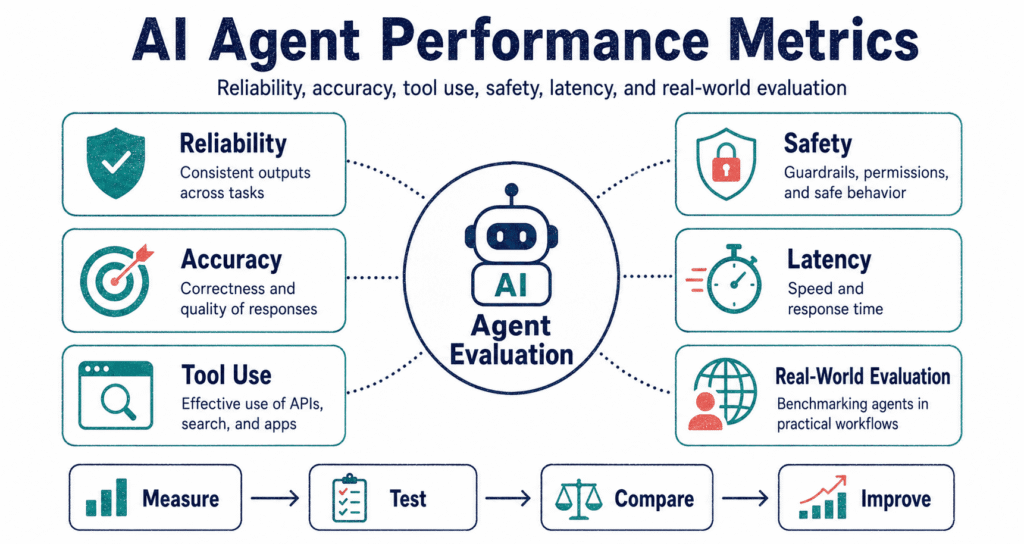
Agent performance metrics show if your bot actually works. Forget standard text generators—these systems map out steps, click buttons, read tool outputs, store memory blocks, and push data directly to live databases, meaning you absolutely cannot just glance at the final paragraph and blindly assume the entire job went perfectly. The whole game changed.
Why Agent Evaluation Is Different
Testing normal models comes down to reading the last sentence. Is it right? Sure, those basic checks still matter, but relying entirely on them leaves a massive blind spot when you start letting code make actual decisions in the wild. You need more.
These setups string together wild moves. They hit APIs, scrape messy web pages, dig through your local folders, and write python scripts on the fly—so getting the right answer means absolutely nothing if the bot burned through fifty dollars of API credits or almost dropped a production table to find it. One mistake ruins everything.
Look at the path. The result proves the job got done, while the trail of logs—every single API call, retry, and misstep—shows you exactly how close the system came to completely falling apart.
The golden rule: stop staring at the final text box. Track what it clicked, what it ignored entirely, the weird leaps in logic it made, and if it stayed inside your guardrails.
The Agent Evaluation Stack
Good testing stacks run deep. You check task completion at the very top layer, then drill down into API hits, fact-checking, speed limits, hard cloud costs, and whether a real human actually found the whole ordeal useful. It varies wildly.
Think about the use case—a web scraper just needs to not crash the browser instance, while a customer service bot must follow strict company return policies without making up fake promo codes for angry users. Code generators? They just need to pass the unit tests.
Agent Evaluation Pipeline
Task
Test Set
Trials
Trajectory
Outcome
System
Task Success Rate
Results matter most. Task success sits right at the top of the pile, tracking the raw win rate—did the bot actually book the 3 PM haircut, pull the 2025 Q1 revenue report, or flip the right configuration switch in the database? Nothing else matters if this step fails.
Vague goals ruin everything. Asking the bot to “find good data” tells you nothing, but demanding the exact URL for the 30-day return policy along with a clean three-bullet summary gives you a hard target you can actually test against. Set real rules.
Keep it simple. Either it worked or it crashed and burned—but eventually, you can start handing out half-points for runs where the script pulls all the right JSON data but forgets to format the final markdown table.
| Metric | What it measures | Example | Best use |
|---|---|---|---|
| Task Success Rate | Did it hit the exact goal? | Script updates the CRM correctly. | High-level grading. |
| Partial Completion | How far did it get before dying? | Grabbed the file but missed the email. | Fixing long pipelines. |
| Final Answer Accuracy | Does the text actually hold up? | Spits out the correct legal clause. | Research bots. |
Final Answer Accuracy
It gets messy. Checking the final text seems easy since we do this with standard models constantly, but agents drag a massive chain of API logs, scraped HTML, and scratchpad math into the mix that completely muddy the waters.
Hard facts just need an answer key. Pulling names from a PDF requires exact string matching, while code generation simply needs to compile and pass tests instead of having some guy sit there and read over the syntax. Pick the right stick.
Stop grading on style. A perfectly formatted, polite paragraph can be a complete lie, while a single, uncapitalized word might be the exact correct database ID you asked the system to hunt down. Check the facts first.
Trajectory Quality
Watch its hands. Trajectory looks at the messy middle—did the system actually run a search query, or did it just guess the answer, loop through three useless steps, and refuse to double-check its own math before spitting out a result?
It lies. You might get a great-looking summary at the end, only to dig into the system logs and realize the bot completely ignored a 404 error from your database and just made up the numbers anyway.
Track the steps. ReAct setups basically beg for this kind of tracking, and since the system has to write out its internal thoughts before taking any action—as Codeayan points out in the ReAct prompting guide—you get a perfect paper trail to rip apart later.
| Trajectory metric | Question it answers | Failure example |
|---|---|---|
| Tool selection accuracy | Did it pick the right API? | Googles something instead of checking the internal wiki. |
| Step relevance | Did it wander off? | Clicks three random links before starting the job. |
| Observation use | Did it read the error codes? | Ignores a failed login and keeps scraping blank pages. |
| Stopping quality | Did it know when to quit? | Keeps running expensive queries after finding the answer. |
Tool Use Accuracy
It happens constantly. Hitting the right API with the exact right JSON payload is a whole separate skill, and the model might have the smartest reasoning in the world but still crash entirely because it shoved a text string into an integer field.
Think about a bot trying to run SQL. It has to pick the correct table, draft a clean query without dropping the whole database, grab the output, and actually read the rows instead of just guessing what they say based on the column headers. Watch the execution.
Track the failures. Count the bad arguments, the completely missed calls, and the times it hit the same endpoint five times in a row for no reason—which tells you instantly if your bot is dumb or if your API just sucks.
{
  "task_id": "support_refund_policy_014",
  "user_goal": "Find the refund eligibility period and summarize it.",
  "expected_outcome": "Return official refund window and key conditions.",
  "agent_result": {
    "final_answer_correct": true,
    "task_success": true,
    "tool_calls": 3,
    "invalid_tool_calls": 0,
    "unverified_claims": 0,
    "latency_seconds": 18.4,
    "human_review_required": false
  },
  "trajectory_notes": [
    "Used official policy page.",
    "Checked date of policy update.",
    "Did not use unrelated blog sources."
  ]
}
Grounding and Citation Accuracy
Grounding forces the system to back up its talk with real proof. If your bot handles legal contracts or internal company wikis, it absolutely cannot slap a citation next to a claim unless that exact document actually says what the bot claims it says. Fake citations ruin trust.
Getting this right takes two distinct steps. You need the link to point to a real file, and the text in that file has to actually back up the sentence—a test that a shocking number of popular models fail on a daily basis. They hallucinate wildly.
Fix the bad data. This ties right into the Agentic RAG pipeline, where the system needs to pull a file, realize the file is completely useless, throw it out, and run a brand new search instead of forcing a bad answer.
Reliability Across Repeated Runs
Consistency is brutal to achieve. If you throw the exact same prompt at the bot ten times in a row, does it nail it nine times, or did you just get incredibly lucky on the single run you recorded for the demo? Luck is not a strategy.
These systems run on pure probability. A half-second delay on an API call or a web button shifting three pixels to the left can send the entire thought process completely off the rails, so your build has to survive that mess. It has to handle chaos.
Break it on purpose. Rewrite the prompt, throttle the network speed, swap out the reference PDFs, and see if the bot completely loses its mind or if it actually adapts to the problems you threw at it.
The reality check: a single working demo is practically worthless. You only know it works after throwing a hundred weird, broken edge cases at it.
Handling Edge Cases
Real environments hate your code. APIs timeout, search rankings flip overnight, users type in half-sentences with terrible spelling, and websites throw massive cookie banners right over the button your bot is trying to click. It is a nightmare.
Bad bots just plow forward and crash. A smart system stops, realizes the database returned an empty array, backs up, and asks the user what to do next—which is vastly better than pretending everything is fine and returning a blank page. Drop the ego.
- Missing info: Ask instead of guessing.
- Tool failure: Switch methods or throw an error.
- Conflicting evidence: Cross-check the facts.
- Ambiguous task: Find the catch.
- Unexpected environment: Stop clicking blindly.
Safety and Policy Compliance
Safety checks stop disasters. Letting a script write a draft is fine, but handing it the keys to your Stripe account, production databases, and customer email lists without serious restrictions is basically begging for a company-ending incident. Lock it down.
The bot needs strict boundaries. Scraping a public blog poses almost zero risk, but updating a billing address or hitting the ‘Delete Workspace’ button needs a hard stop and a physical human to click approve before anything executes. Set hard boundaries.
Attack your own setup. Hide invisible text on a webpage telling the bot to dump all its memory, or ask it to pull salary data it has no business seeing, and see if it actually refuses the bait. Check out Human-in-the-loop Governance for more on this. Don’t trust the machine.
| Safety metric | What it measures | Good behavior |
|---|---|---|
| Unauthorized action rate | Sneaking around permissions. | Stops and asks before deleting things. |
| Refusal accuracy | Pushing back on bad requests. | Drops the task if it violates rules. |
| Prompt injection resistance | Ignoring hacks hidden in text. | Treats raw data as text, not a command. |
| Escalation quality | Calling for help. | Hands the mess over to a human. |
Latency, Cost, and Efficiency
Being right isn’t a free pass. If your automated assistant takes an hour to do a five-minute data entry job—and burns three dollars in API tokens to do it—you might as well just hire a human and save the headache. Math matters.
Track the hard limits. Count the total seconds spent spinning, the exact number of tokens burned, the constant API retries, and the literal dollar cost of every single success. Count the pennies.
Do not get cheap too fast. A lightning-fast bot that deletes the wrong database is completely useless, so nail down the accuracy first before you start cutting corners and caching API calls to save a few cents. Get it right first.
Memory Quality
Memory keeps the bot from running in circles. It has to stash user preferences, remember what it did three steps ago, and—most importantly—figure out exactly when to throw out old data that just doesn’t apply to the current situation anymore. State management is hard.
Bad recall breaks everything. The system might try to edit a file it already deleted ten minutes ago, or stubbornly apply a format setting you explicitly told it to turn off in the last prompt. Clean the slate.
Track the dead files. Note how often it pulls up garbage information, and dive into Codeayan’s breakdown on short-term and long-term context retention to figure out how to actually clear the cache.
Human Evaluation Metrics
You still need humans in the loop. A script cannot tell you if an email sounds like a robot wrote it, or if a perfectly factual summary is formatted so badly that it gives the reader a headache just looking at it. Vibes actually count.
Stop asking people if the output looks fine. Force them to grade the tone, the formatting, the facts, and the safety on a strict, completely inflexible rubric so you actually get real data you can plug back into the system. Be ruthless.
| Human review area | Question | Score type |
|---|---|---|
| Usefulness | Did the bot actually fix the problem? | 1 to 5 rating. |
| Completeness | Did it skip half the request? | Pass, partial, fail. |
| Tone | Does it sound like a machine? | Rubric-based rating. |
| Trust | Would you let this run unattended? | Approve, revise, reject. |
Building an Agent Evaluation Dataset
You need a brutal testing gauntlet. If you only feed the system easy questions and perfectly formatted PDFs, your success rate will look incredible—right up until a real user completely destroys the entire logic tree in five seconds flat. Test the ugly stuff.
Pull real logs. Map out exactly what the users wanted, the messy files they uploaded, and exactly what the bot was strictly forbidden from touching.
Lock down a core testing set. Every single time you tweak a prompt or update a model, you slam those exact same tests through the pipeline again to make absolutely sure you didn’t accidentally break the entire system while fixing a typo. Guard your progress.
A Practical Metrics Dashboard
Throw out the bloated dashboards. Stop tracking twenty different meaningless stats and just figure out if the bot is actually getting faster, safer, and smarter over time without drowning your team in charts. Keep it tight.
| Dashboard section | Core metrics | Warning sign |
|---|---|---|
| Outcome | Win rate, fact checks, partial passes. | Tons of partials, no actual wins. |
| Trajectory | API picks, step tracking, validation checks. | Right answers pulled from garbage methods. |
| Reliability | Run consistency, edge-case survival, crash recovery. | Breaks the second you change the prompt. |
| Safety | Rule breaks, block accuracy, cry-for-help rate. | Deletes things without asking. |
| Efficiency | Speed, API hits, token burn, dollar cost. | Bills go up, performance stays flat. |
Common Mistakes in Agent Evaluation
Staring only at the final output is a massive mistake. You end up completely blind to the messy, expensive, and outright dangerous things the bot did behind the scenes to get there, which will eventually come back to bite you. Dig into the logs.
Toy examples prove absolutely nothing. Real life has broken links, confusing user prompts, database timeouts, and weird edge cases that will completely fry a system built only for clean, scripted demonstrations. Demos prove nothing.
Test the brakes. Throw garbage data, hack attempts, and locked files at it to see if it knows when to quit.
- Stop grading just the final paragraph.
- Track the bad API calls and loops.
- Throw broken edge cases at the system.
- Keep your test data away from your training data.
- Fix the facts before you fix the speed.
Key Takeaways
- Agent performance metrics dig into both the final text and the messy path it took to get there.
- Task success rules the board, but you have to back it up with hard checks on safety and facts.
- Tool accuracy tracks if the script actually fired the right payload at the right endpoint.
- Real tests hammer the bot with repeated runs, bad inputs, and constant variations.
- Safety stops matter the second your code touches a live database or email server.
- Your dashboard just needs to track wins, path quality, crash rates, safety blocks, and server costs.
Conclusion
Grading these systems is a headache because they actually take action. They build logic trees, fire off API calls, read the output, swap out memory blocks, and physically alter external systems—which means you have to measure the hard costs, the path, and the safety checks along with the final text. Actions matter.
The right metrics depend entirely on the job. A scraper needs to handle bad HTML, a support bot needs to follow strict refund rules, and a coding bot just needs to write scripts that pass the test suite without deleting the repository. Context is everything.
Set up hard rules, lock down a brutal test suite, check the internal logs, put up safety blocks, and run the whole gauntlet every single time you push an update. Test constantly.
Further reading: Hit up the OpenAI Evals, dig into LangSmith evaluation approaches, or check out WebArena and OSWorld.